

Accessing Tax Documents in AdviceWorks

Accessing Your Tax Documents from the AdviceWorks Client Portal
At Himelick Financial Group, we strive to make your financial experience as seamless as possible. That's why we're excited to provide you with easy access to your important end-of-year tax documents through our secure online client portal, AdviceWorks.
This guide will walk you through the simple steps to download your consolidated Form 1099s, 1099Rs, and year-end account statements, ensuring you have all the necessary information for tax filing season.
Why Use the Client Portal?
- Convenience: Access your tax documents anytime, anywhere, from any device with an internet connection.
- Security: Our client portal utilizes robust security measures to protect your sensitive financial information.
- Efficiency: Eliminate the need for paper documents and streamline your tax preparation process.
- Environmental Friendliness: Reduce your environmental impact by opting for electronic document delivery.
Downloading Your Tax Documents
- Sign into AdviceWorks by navigating to client.adviceworks.net
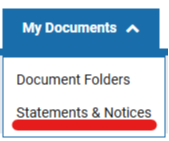
- From the top banner, select the My Documents dropdown menu

- From the dropdown menu, select Statements & Notices
- You should be redirected to the Statements section; from here, select Tax Docs

- Once redirected, you will see a list of all your available tax documents. Click the download icon next to each document to save it to your device
Please note that the availability of tax documents may vary depending on the specific document type and processing timelines. If you encounter any issues accessing the client portal or have any questions regarding your tax documents, please don't hesitate to contact our office using the form below.